View an Event
How do I view all of my events on the Calendar?
How do I sort events on the Calendar?
Why can’t I see my newly created Event on the Mobile app?
Why can’t I view my past events on the Mobile app?
Why can’t I see my events on Google Calendar?
How do I view all of my events on the Calendar?
- Open the Event dashboard by clicking “Event” on the left sidebar.
- Click the calendar icon at the top on the right side of the search bar to view.

How do I sort events on the Calendar?
At the top of the page to the right of the search bar, there is an icon with 3 vertical lines and a small arrow. Clicking this icon will prompt you to sort your events.
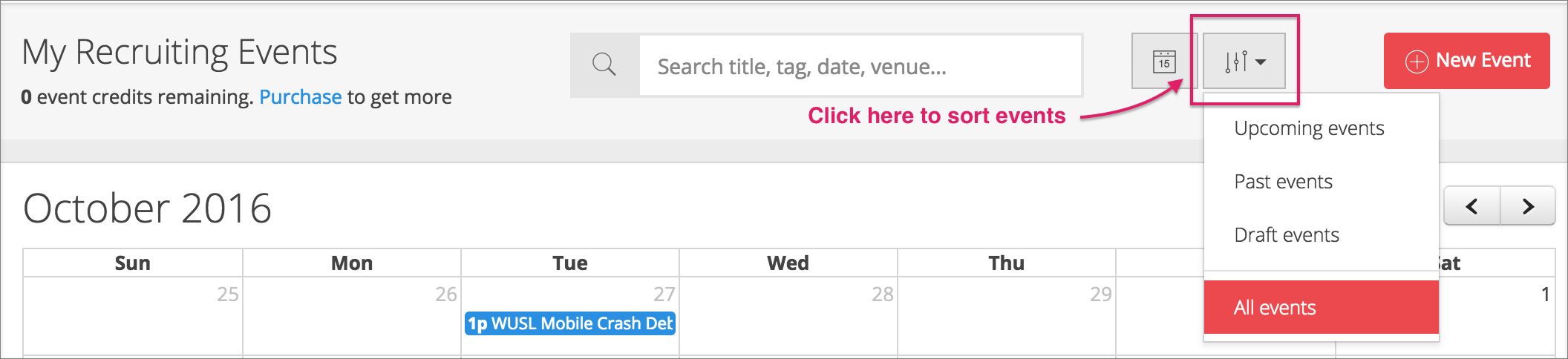
Why can’t I see my newly created Event on the Mobile app?
Make sure your created Event has gone live and the Evaluation form you have assigned to the event is published before viewing them on your Mobile app (both are required for an event to be Mobile Ready). If the event still does not show up, refresh the event list, restart the app or re-login.
Why can’t I view my past events on the Mobile app?
You can view a past event within 10 days after it has ended. After that, it will no longer be shown on the mobile app to avoid cluttering the app interface. If you have recruiting events that last longer than 10 days each, you will need another event credit to start a new event.
Why can’t I see my events on Google Calendar?
You might have turned on Google Calendar integration after creating the events. New events will only be shown on your Google Calendar after you have enabled the integration.